HTTP Security Headers Guide: What to Fix First
If you are running a security headers check with SecurityHeaders.com, the biggest mistake is trying to fix everything at once.
A better approach is to review each HTTP Security Header, separate the easy wins from the risky changes and then fix the headers in the right order.
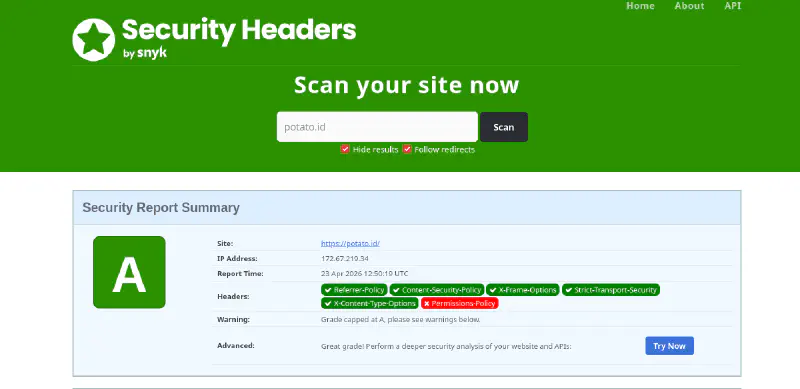
For this draft, we use the sample SecurityHeaders.com report for this website.
Site: https://potato.id/
IP Address: 172.67.219.34
Report Time: 22 Apr 2026 16:50:39 UTC
Headers:
- Referrer-Policy
- Content-Security-Policy
- X-Frame-Options
- Strict-Transport-Security
- X-Content-Type-Options
- Permissions-Policy

Warning: Grade capped at A, please see warnings below.
The interesting part here is not just the grade. It is the warning. A site can already look “good” or A Grade in SecurityHeaders.com but still have a few settings that should be tightened first.
What SecurityHeaders.com Report Usually Means
Based on an analysis of using SecurityHeaders.com, which evaluates website security by checking the presence and configuration of critical HTTP response headers, this website already demonstrates several strong security practices.
SecurityHeaders.com reviews a set of essential headers to assess how well a website protects users against common vulnerabilities such as cross-site scripting (XSS), clickjacking and data injection attacks. These headers include key protections like Content Security Policy (CSP), X-Frame-Options, X-Content-Type-Options and others that form the foundation of modern web security.
From the current configuration, potato.id successfully implements several key security headers:
- Enforces HTTP to HTTPS redirection, ensuring encrypted communication
- Uses X-Frame-Options: DENY to prevent clickjacking attacks
- Applies X-Content-Type-Options: nosniff to block MIME-type sniffing
- Sets Referrer-Policy: no-referrer to protect sensitive referrer data
- Enables Strict-Transport-Security (HSTS) for secure connections
- Implements a Content-Security-Policy (CSP) to control resource loading
This is a solid baseline.
But a security header review should not stop there, because two issues usually matter most after the basics are present:
- A header may still be missing entirely, even if not highlighted prominently in basic reports (for example, Permissions-Policy)
- A header may be present but overly permissive, particularly in the case of Content-Security-Policy which requires careful tuning to be effective
That is usually why the next fixes are about quality, not just presence.
Which HTTP Security Header Should You Fix First?
If your goal is to improve HTTP security headers quickly without breaking your site, the best approach is to prioritize fixes based on how simple they are to implement and how low the risk is.
Instead of starting with complex headers like CSP, this list focuses on quick wins first, then gradually moves toward more advanced configurations.
1. Keep and Verify Existing Low-Risk Headers (Quick Wins)
These headers are already widely supported, easy to maintain and rarely cause issues. If they exist, keep them. If missing, add them immediately.
X-Content-Type-Options: nosniffto prevents MIME-type sniffingX-Frame-Options: DENYto blocks clickjackingReferrer-Policy: no-referrerto limits referer leakage but better withsame-originvalue- Clean and safe HTTPS redirect to enforces secure access
These are considered baseline security headers and are usually the first checks tools like SecurityHeaders.com validate.
2. Add Permissions-Policy (Safe and Simple Upgrade)
Next, implement Permissions-Policy if it’s missing.
Why this is still easy:
- Doesn’t affect layout or rendering
- Only restricts browser features
- Safe when starting with a deny-all approach
Example baseline:
Permissions-Policy: geolocation=(), camera=(), microphone=(), payment=(), usb=()
This disables access to sensitive browser APIs unless explicitly allowed to reducing unnecessary exposure with minimal effort.
3. Enable or Confirm HTTPS + Basic HSTS (Low Complexity)
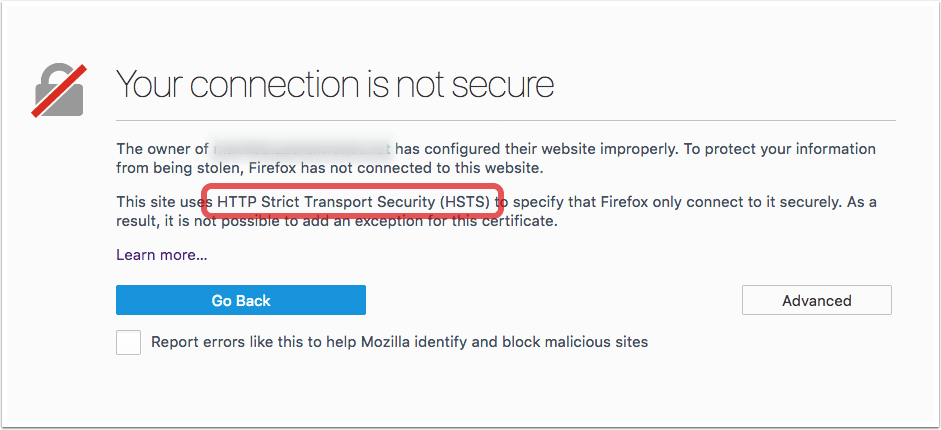
If your site already redirects to HTTPS as default, the next step is ensuring Strict-Transport-Security (HSTS) is present.
Basic version:
Strict-Transport-Security: max-age=15552000
At this stage, keep it simple:
- Don’t worry about preload yet
- Don’t force subdomains unless you’re sure with all your services that running under other subdomain
This step strengthens transport-layer security without introducing much risk.
4. Extend HSTS (Moderate, Needs Monitoring and Trial)
Once HTTPS is stable on all of your subdomains, you can safely increase HSTS strength.
Stronger version:
Strict-Transport-Security: max-age=31536000; includeSubDomains
This improves long-term enforcement but requires confidence that:
- All subdomains support HTTPS
- TLS/SSL Certificates are consistently managed
Still relatively easy but mistakes here can have broad and longer-lasting effects.
5. Tighten Content-Security-Policy (Hardest, Highest Impact)
This is where things get more complex.
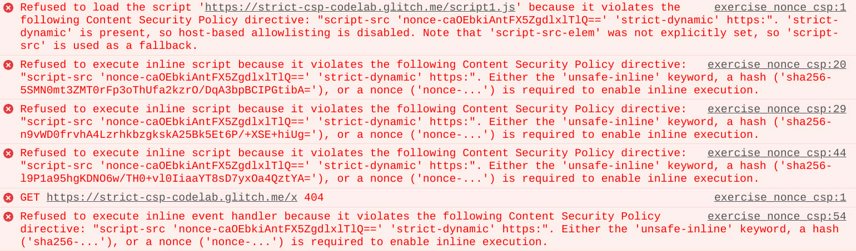
Even if your site already has a CSP, it may still be too permissive. Tools like SecurityHeaders.com often flag policies that include:
'unsafe-inline''unsafe-eval'- Wildcards like
*
These weaken protection against XSS and third-party script abuse.
Improving CSP requires:
- Auditing all scripts and resources
- Replacing unsafe directives with nonces or hashes
- Testing thoroughly before enforcement
This is why CSP is last-it offers the highest security gain, but also the highest risk of breaking functionality.
Practical “Easiest to Hardest” Fix Order
Recommended Optimization Path (Easiest to Hardest) to safely improve your configuration over time, follow this order:
- Keep and verify baseline headers (nosniff, DENY, Referrer-Policy, HTTPS)
- Add or refine Permissions-Policy
- Enable and validate HSTS
- Extend HSTS once HTTPS is fully stable
- Gradually tighten Content-Security-Policy (CSP) by auditing your website needs
This approach balances quick wins and long-term hardening without breaking your site.
What to Fix Next (Based on this website Results)
Based on the current security header setup of this website, most core headers are already implemented. That means the focus should now shift from adding headers to improving the quality, as typically highlighted by tools like SecurityHeaders.com.
Priority Order:
- Permissions-Policy Need added new Permission-Policy based on needs
- Content-Security-Policy This is the most likely weak point. Even if present, it may still be too permissive, need to focus on removing unsafe directives, limiting sources and tightening control gradually
- Strict-Transport-Security (Extended) HSTS is already enabled. Time improve it further like preload and higher age
Key Point
This website has the essential security headers in place, which means the priority is no longer chasing a higher score—it’s making those headers stricter and more effective. The biggest gain will come from improving Content-Security-Policy (CSP), since that’s where most real-world weaknesses remain even when a site looks “secure” on tools like SecurityHeaders.com.
Nginx Example for a Better Security Header Baseline
add_header X-Frame-Options "DENY" always;           # Quick Win
add_header X-Content-Type-Options "nosniff" always; # Quick Win
add_header Referrer-Policy "no-referrer" always;    # Quick Win
add_header Permissions-Policy "geolocation=(), camera=(), microphone=(), payment=(), usb=()" always; # Quick Win
add_header Strict-Transport-Security "max-age=31536000; includeSubDomains" always; # Moderate, needs short trial
add_header Content-Security-Policy "default-src 'self'; object-src 'none'; base-uri 'self'; frame-ancestors 'none';" always; # Complex, needs auditing
This setup covers the core HTTP response headers required to protect against common threats such as:
- Clickjacking
- MIME-type sniffing
- Data leakage via referrers
- Unauthorized browser feature access
- Insecure HTTP connections
It also establishes a minimal but safe Content Security Policy (CSP) to control how resources are loaded. But Content-Security-Policy (CSP) should never be treated as a one-size-fits-all solution, it can break Javascript web applications so it’t should be treated carefully and fully audit your javascript and third-party services that used in your application.
If you are also trying to raise your HTTPS test score, see How to Improve Your Qualys SSL Server Test Score and Get A+ in SSL Labs.
FAQ
What is the first security header to fix on a website?
If the basics already exist, Permissions-Policy is often the safest first improvement because it is easy to add and low risk. If your site still has a weak CSP, then Content-Security-Policy is usually the most important deeper fix.
Why does SecurityHeaders.com show a good grade but still warn me?
Because a site can include all required headers but still configure them too loosely. SecurityHeaders.com highlights these warnings to point out real security gaps beyond header presence.
Is CSP more important than X-Frame-Options?
In modern web security, yes. While X-Frame-Options protects against clickjacking, CSP provides broader control over scripts, resources and trust boundaries.
Do security headers make a website fully secure?
No. Security headers reduce browser-side risk, but they do not fix vulnerable code, broken authentication, insecure plugins or weak server patching.
Final Thoughts
HTTP security headers aren’t about chasing a high score on SecurityHeaders.com. It’s more about putting protections in place that make sense without breaking or negatively impacting your application.
Start with the easy wins first. Then gradually tighten things up while testing along the way. Security is a process—there’s no silver bullet.
HTTP security headers are just one layer in a defense-in-depth strategy. They operate at the browser level and don’t replace secure coding practices, input validation, access control or proper system patching.
