How to Improve Your Qualys SSL Server Test Score and Get A+ in SSL Labs
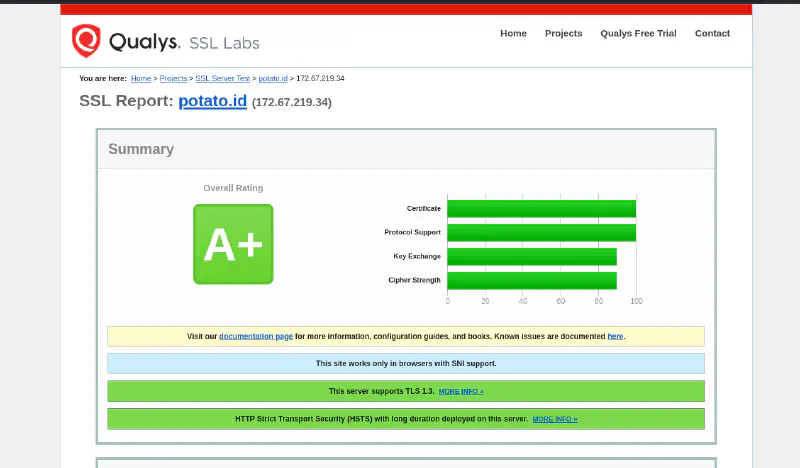
If you are trying to understand how to improve your Qualys SSL Server Test score, you are in the right place. Qualys SSL Server Test, often referred to as SSL Labs, is one of the most widely used public tools for checking how well a website is configured for HTTPS and TLS.
A lot of admins care about getting an A or A+ because it is an easy, visible way to validate that their SSL/TLS setup is modern, secure, and free from obvious mistakes.
This guide focuses on practical fixes, not vague advice. We will cover what the test actually checks, what usually blocks an A+ score, and what settings helped a real test reach A+.
What Qualys SSL Server Test Actually Checks
Qualys SSL Server Test analyzes the public HTTPS configuration of your server. In practice, it mainly looks at these areas:
1. Certificate
It checks whether your certificate is valid, trusted, correctly issued for the hostname, and served with a proper certificate chain.
2. Protocol Support
It checks which SSL/TLS versions your server still supports, such as TLS 1.0, 1.1, 1.2, and 1.3.
3. Key Exchange
It evaluates how secure the key exchange process is, including whether you support modern forward secrecy mechanisms.
4. Cipher Strength
It checks whether your server offers strong modern ciphers or still allows weak legacy ones.
5. HSTS and HTTPS Behavior
It also looks at HTTPS behavior that affects trust and downgrade resistance, especially whether:
- HTTP redirects cleanly to HTTPS
- HSTS is enabled correctly
- the site behaves consistently on secure connections
In short, the test is not just about having a certificate. It is about whether your whole HTTPS setup is modern and safe.
What Usually Keeps Sites From Getting A+
A lot of websites already have HTTPS, but they still stop at A or lower because of one or more common issues.
No HSTS
This is one of the most common reasons a site misses A+. You may already have a valid certificate, but without HSTS the browser is still more exposed to downgrade-style attacks.
TLS 1.0 or TLS 1.1 Still Enabled
Legacy protocol support drags the score down and increases compatibility with outdated, less secure clients.
Weak Ciphers
If your server still allows weak or old cipher suites, Qualys will reflect that in the score.
Broken Certificate Chain
Even if the certificate itself is valid, a missing or incomplete intermediate certificate can hurt the result.
Bad Redirect Behavior
If HTTP does not redirect properly to HTTPS, or if redirect logic is inconsistent, that can weaken the overall HTTPS posture.
Expired or Misconfigured Certificate
An expired certificate, wrong hostname coverage, or other certificate errors will immediately prevent a strong score.
What Helped Achieve A+ Significantly
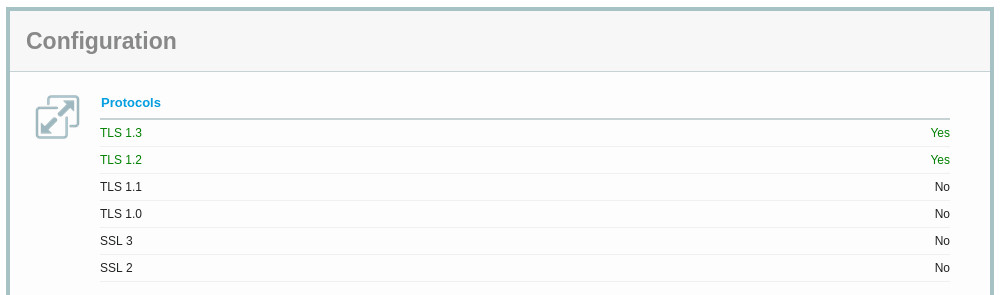
In the real test result we reviewed, the A+ score was supported by a few important things working together:
- HTTP redirected to HTTPS cleanly
- HSTS was enabled
- the site served an ECDSA certificate
- TLS 1.3 was available
- OCSP stapling was working
- the certificate chain was valid
That combination matters because it shows a server that is not just encrypted, but configured in a modern and complete way.
A few notes:
- HSTS is often the difference between A and A+
- TLS 1.3 helps show that the server supports modern protocol negotiation
- a valid full chain prevents trust and validation issues
- OCSP stapling improves certificate status handling and is generally a good sign of a well-tuned TLS setup
- an ECDSA certificate is not mandatory for A+, but it is a strong modern choice when your stack supports it
How to Improve Your Qualys SSL Server Test Score in Practice
If your goal is to improve the result in SSL Labs, focus on the basics first.
Core Improvements
- set the minimum supported version to TLS 1.2
- enable TLS 1.3
- enable HSTS
- disable TLS 1.0 and TLS 1.1
- serve the full valid certificate chain
- use strong modern ciphers
- make sure HTTP redirects to HTTPS consistently
For Cloudflare
If you use Cloudflare, review these settings first:
- set Minimum TLS Version to TLS 1.2
- keep TLS 1.3 enabled
- enable Always Use HTTPS
- enable HTTP Strict Transport Security (HSTS) carefully
- use a valid certificate at the origin if you are running Full (strict) mode
Important: do not enable HSTS until you are sure HTTPS works correctly on the main domain and any important subdomains.
For Nginx
A practical baseline looks like this:
ssl_protocols TLSv1.2 TLSv1.3;
ssl_prefer_server_ciphers off;
ssl_stapling on;
ssl_stapling_verify on;
add_header Strict-Transport-Security "max-age=31536000; includeSubDomains" always;
Also make sure your HTTP server block redirects to HTTPS:
server {
    listen 80;
    server_name example.com www.example.com;
    return 301 https://$host$request_uri;
}
And make sure the certificate setup includes the full chain provided by your CA.
For Apache
A practical baseline looks like this:
SSLProtocol             -all +TLSv1.2 +TLSv1.3
SSLUseStapling          on
Header always set Strict-Transport-Security "max-age=31536000; includeSubDomains"
You should also verify that:
- old protocol support is disabled
- the correct certificate files are installed
- intermediate certificates are included properly
- HTTP requests redirect cleanly to HTTPS
About Cipher Suites
Do not chase exotic cipher tuning unless you know why you need it. In most cases, the better move is simple:
- remove weak legacy support
- keep modern defaults
- prefer TLS 1.3 where possible
- avoid compatibility settings meant for very old clients
For TLS 1.2, a practical modern cipher sample can look like this.
Nginx sample cipher configuration
ssl_ciphers 'ECDHE-ECDSA-AES128-GCM-SHA256:ECDHE-RSA-AES128-GCM-SHA256:ECDHE-ECDSA-AES256-GCM-SHA384:ECDHE-RSA-AES256-GCM-SHA384:ECDHE-ECDSA-CHACHA20-POLY1305:ECDHE-RSA-CHACHA20-POLY1305';
ssl_prefer_server_ciphers off;
Apache sample cipher configuration
SSLCipherSuite ECDHE-ECDSA-AES128-GCM-SHA256:ECDHE-RSA-AES128-GCM-SHA256:ECDHE-ECDSA-AES256-GCM-SHA384:ECDHE-RSA-AES256-GCM-SHA384:ECDHE-ECDSA-CHACHA20-POLY1305:ECDHE-RSA-CHACHA20-POLY1305
SSLHonorCipherOrder off
For TLS 1.3, most modern stacks handle cipher selection separately and usually do not require aggressive manual tuning. In practice, the safer path is to keep TLS 1.3 enabled and avoid legacy fallback settings unless you truly need them.
Can You Go Higher Than A+?
Short answer: no.
For Qualys SSL Server Test, A+ is already the target. Once you get A+, you are not trying to unlock a hidden higher grade. At that point the goal shifts from “higher score” to maintaining a clean, modern, stable configuration.
That means:
- renew certificates on time
- keep redirects working
- keep HSTS intentional and correct
- avoid re-enabling weak legacy protocols for convenience
- retest after infrastructure changes, CDN changes, or certificate replacements
Quick Checklist
Use this before you retest in SSL Labs:
- HTTPS redirect works
- HSTS is enabled
- minimum protocol is TLS 1.2 or higher
- TLS 1.3 is enabled
- certificate is valid and modern
- full certificate chain is served
- no weak legacy protocol support remains
- no weak cipher configuration remains
- OCSP stapling is working if supported by your stack
If those items are in good shape, your chances of getting A+ are much better.
FAQ
Does HSTS guarantee an A+ score?
No. HSTS helps a lot and is often required for A+, but you still need a valid certificate, strong protocol support, clean redirects, and no weak legacy configuration.
Can I get A+ without TLS 1.3?
Sometimes yes, depending on the rest of the configuration, but enabling TLS 1.3 is still strongly recommended because it reflects a more modern setup.
Does Cloudflare automatically give me A+?
Not always. Cloudflare can help with HTTPS settings at the edge, but you still need to review your TLS behavior, redirects, HSTS policy, and certificate setup carefully.
Should I enable HSTS preload immediately?
Usually no. First make sure HTTPS is stable everywhere you need it, including important subdomains, then enable stricter HSTS settings gradually.
Final Thoughts
Getting an A+ in SSL Labs is usually not about one magical setting. It is the result of several basic things being done correctly: clean HTTPS redirects, HSTS, modern TLS support, a valid full chain, and no unnecessary legacy baggage.
If your site is already at A, you are often just one or two fixes away from A+.
