What Is Infatica P2B Network? How to Remove Infatica from Windows
What Is Infatica P2B Network?
Infatica P2B Network is a service from the Infatica company that operates using a peer-to-business (P2B) model.
This means: your device can be used as a proxy network node, where a small portion of your internet bandwidth is “shared” with the Infatica network or users of the service.
It is commonly used for:
- Web scraping
- Market research
- Testing website access from various locations
- Data collection by companies
Is Infatica Dangerous?
Infatica is known as part of a proxy network (P2B Network). This means your computer can be used as part of a global internet network.
Although officially used for business purposes, networks like this are often misused because they fall into the residential proxy category. Residential proxies are very “valuable” because they use real home user IP addresses, making traffic appear normal and allowing bypass of anti-bot checks.
In other words, your network could be used by irresponsible parties for activities such as:
- Hackers hiding identity while scanning targets
- Botting (creating mass accounts)
- Bypassing limits / geo restrictions
- Aggressive scraping without permission
- Ad click fraud
- Spam activity
- Bypassing website security systems
Additionally, using your internet traffic as a residential proxy can create impacts such as IP reputation risks, where your IP address may be blacklisted, blocked by websites, frequently hit with CAPTCHA, or flagged as suspicious activity. Internet connection may also feel slower because some bandwidth is used to relay traffic, increasing ping and making the connection less stable.
There are also indirect security risks because traffic from proxy networks can originate from risky activities that may technically be traced back to your IP. From a performance perspective, background services can increase CPU and RAM usage, especially on older devices. From a privacy perspective, you open inbound and outbound connection paths and give partial network control, which some users may find uncomfortable.
Why Can Infatica Get Installed?
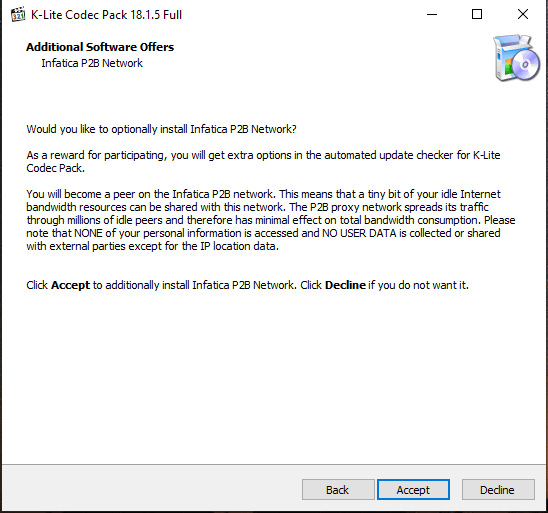
In some versions of the K-Lite Codec Pack installer, there are additional offers (bundled software) during installation.
If users:
- Do not choose Custom Install
- Do not read options carefully
- Click “Next” repeatedly
- Click “Accept” on the install offer
Then Infatica may be installed without realizing it.
How to Check If Infatica Is Installed
- Open Settings → Apps → Installed Apps
- Search for: Infatica P2B Network
Or open Task Manager and check for the process:
infatica_agent.exe
How to Remove Infatica P2B Network on Windows
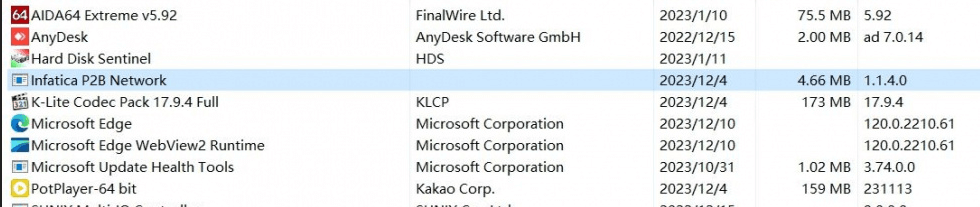
Method 1: Uninstall from Settings
- Open Settings
- Go to Apps
- Find Infatica P2B Network
- Click Uninstall
Tips to Prevent It from Being Installed Again
If you still want to use K-Lite Codec Pack:
- Always choose Custom Install
- Read each option carefully
- Do not check additional software you don’t need
Alternatively, you can use media players like VLC which already include built-in codecs without additional installers.
Conclusion
Infatica P2B Network should be removed if you did not intentionally use it because it is not an essential component and can consume bandwidth, run in the background, and potentially create privacy and IP reputation risks. Removing it is the safest choice to maintain performance and full control over your internet connection.
