There is no way it's DNS
Preamble
Some time ago, there was a bit of discussion at the office regarding a new policy from the DKI Jakarta Provincial Government about deactivating Jakarta ID cards for residents who are no longer domiciled in Jakarta. Several colleagues were affected, so others who still had Jakarta ID cards immediately checked their NIK status.
However, as we know, many people have had bad experiences accessing digital government services, ranging from slow loading to being completely inaccessible. My colleagues experienced the same thing. There was also something strange when accessing the website in question, sometimes it worked, sometimes it showed a maintenance page. Out of nowhere, a thought crossed my mind: this must be DNS.

Without thinking twice, I checked the nameservers registered for the jakarta.go.id domain using the command whois jakarta.go.id. The result showed three nameservers: ns4, ns5, and ns10.

From those three domains, I checked whether the IP addresses of the nameservers were still registered using dig. All three nameservers were located in the same IP segment: 103.209.7.1/24.

Next, I tested connectivity to port 53 using the UDP protocol. All three returned an open port status, which seemed like a good sign.

However, when testing the A record query for jakarta.go.id against the three nameservers, several anomalies appeared:
- ns10 (IP .69) responded with IP 103.209.7.64 for the A record query of jakarta.go.id
- ns5 (IP .223) did not respond with any data, likely meaning the A record was empty or not configured
- ns4 (IP .251) returned connection timed out, which usually indicates the DNS service is unreachable or down
From this information, we can assume that ns10 is healthy, ns5 has an active service but missing or unsynchronized records, and ns4 has an inactive DNS service even though port 53 appears open.
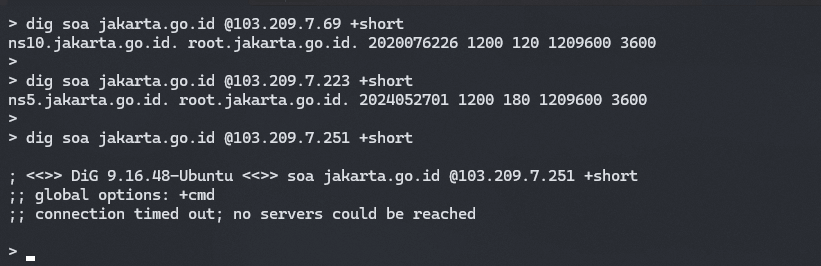
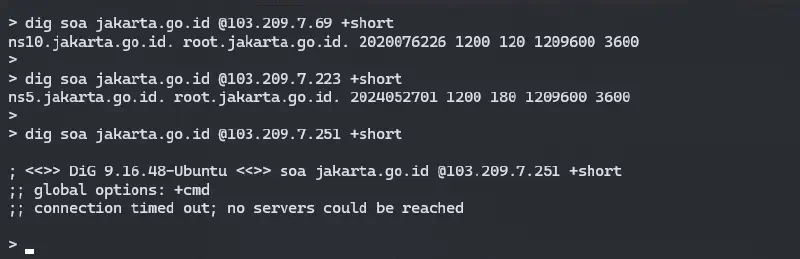
Regarding anomaly number 2, since one nameserver responded with empty data rather than timing out, I checked whether the data across the three nameservers was properly synchronized. In DNS, there is an SOA Serial Number that changes every time DNS records are updated. The usual format is YYYYMMDDNN (Year, Month, Day, Revision Number). SOA helps maintain synchronization between master and slave DNS systems.
On ns10, the SOA Serial was 2020076226. On ns5, it was 2024052701. Meanwhile, ns4 did not respond at all because the nameserver was effectively down. This indicates that ns5 is the most up to date nameserver, while ns10 has not been synchronized since 2020, about four years ago. This explains the anomaly mentioned earlier.

After checking with whois and dig, I remembered there is a service called intodns.com that provides detailed DNS analysis. The service also reported that unsynchronized SOA records can have serious consequences and should be fixed immediately.

In addition to the SOA issue, it also confirmed that ns4 was not responding to DNS queries and that its parent nameserver was not properly registered among the other nameservers.
Impact
What happens if a domain has a DNS configuration like this?
- If records are out of sync, some clients may still resolve old records, resulting in outdated web pages. In this case, empty records likely affect stability when accessing the domain.
- If a nameserver is down, it can cause delays when the domain is accessed because the browser or recursive DNS resolver needs extra time to retry queries against other nameservers.
- Overall performance degradation may occur due to poor reliability and improper DNS configuration. The healthy nameserver may also become overloaded with too many queries, increasing response time.
Lesson Learned
What should and can we do?
-
As sysadmins, we can remove ns4 from the parent nameserver configuration in the domain dashboard if it is no longer used. If it is still needed, ensure the DNS service is healthy and properly synchronized.
-
Resynchronize ns10 with ns5 so that DNS records remain consistent across all registered nameservers, preventing anomalies or outdated data from being served to browsers or recursive resolvers.
-
As users, we can manually point the domain to a specific IP address to avoid external DNS queries. However, this is not considered best practice.
It should be noted that performance and slow loading issues are likely influenced by many other factors beyond what is discussed here. Multiple variables can cause a digital system to feel slow, and proper troubleshooting requires checking each component step by step.
So, how is your DNS configuration? Is it properly set up, or does it have issues like spbe.go.id? Do not forget to check periodically, or use a monitoring service to keep things under control.
