Subdomain Takeover via AWS Elastic Beanstalk
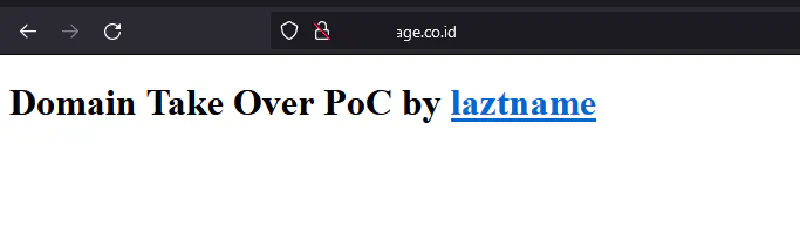
Subdomain takeover is a vulnerability that’s often underestimated, yet carries significant real-world impact. This article covers a real case of subdomain takeover via AWS Elastic Beanstalk - from the core concept and exploitation steps, to detection and prevention.
What Is Subdomain Takeover?
Subdomain takeover (also known as domain takeover or domain hijacking) is a vulnerability that occurs when a domain or subdomain has an active DNS record, but the third-party service it points to has been deleted or deprovisioned.
This condition is commonly called a dangling DNS or dangling CNAME - a DNS record that “hangs” because it points to a resource that no longer exists on the provider’s infrastructure.
Since the resource slot is empty, anyone can register a new resource with the same name and effectively take over the domain or subdomain that originally belonged to the victim.
Why Is AWS Elastic Beanstalk Vulnerable?
AWS Elastic Beanstalk assigns endpoint URLs in the format:
<environment-name>.<region>.elasticbeanstalk.com
When an organization creates an Elastic Beanstalk environment and points their subdomain to that URL via a CNAME record, then later deletes the environment, the following happens:
- The CNAME record in DNS still points to
*.elasticbeanstalk.com - The Elastic Beanstalk environment with that name no longer exists
- Anyone can create a new environment with the same name and take over the subdomain
Case Study: Subdomain Takeover on a .co.id Domain
Here is a real subdomain takeover case found on a .co.id domain.
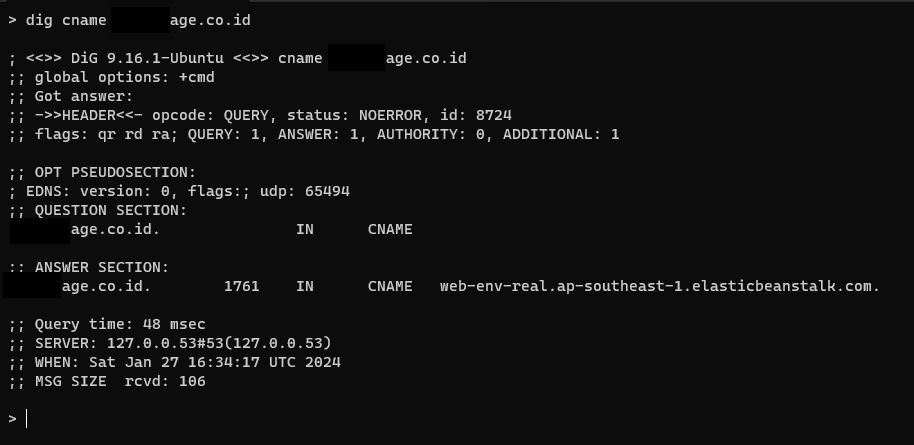
Step 1 - Identify the CNAME Record
First, check and verify the DNS records of the target subdomain. In this case, a CNAME record was found still pointing to an Elastic Beanstalk endpoint.
We queried the domain using dig against the target’s CNAME record.
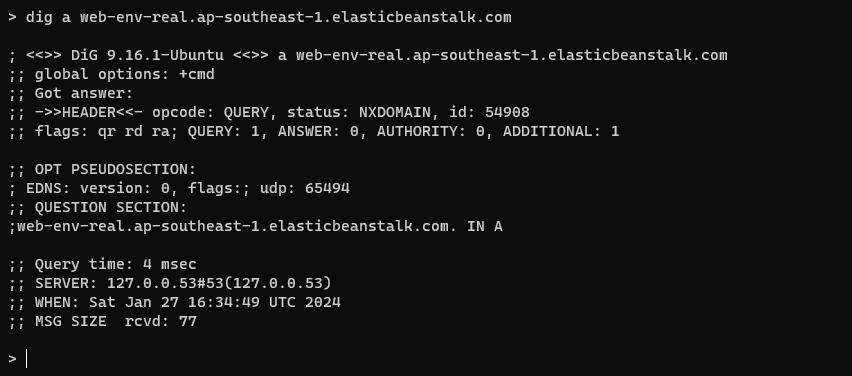
Step 2 - Verify the A Record from the CNAME
Next, verify that the A record resolved from the CNAME points to an AWS IP. This confirms the subdomain is using Elastic Beanstalk as its backend.
Also note the environment name registered in the CNAME - in this case it was registered as web-env-real.
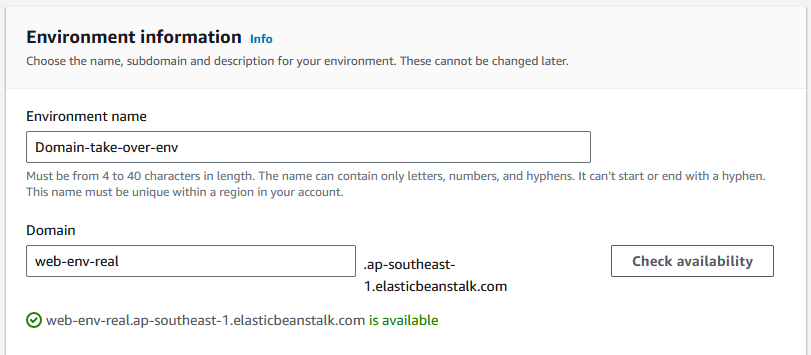
Step 3 - Claim the Elastic Beanstalk Environment
Using the CNAME value, create a new Elastic Beanstalk environment on AWS with the exact same name as the CNAME record. Once the environment is active, the victim’s subdomain automatically points to our environment.
Step 4 - Subdomain Successfully Taken Over
The target subdomain is now fully accessible through the newly created Elastic Beanstalk environment - takeover successful.
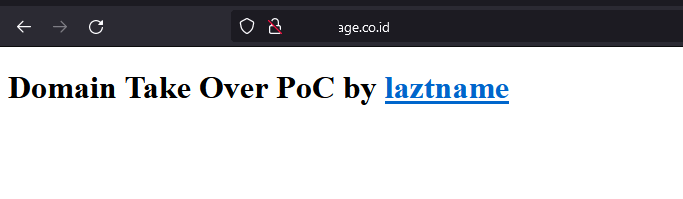
No bounty was awarded for this finding because the service on the subdomain had already been migrated to a new domain. That said, the vulnerability is technically valid and dangerous if discovered by a malicious actor.
Impact of Subdomain Takeover
Subdomain takeover is far more than just “accessing a blank page.” The consequences can be severe:
Phishing
An attacker can build a fake login page identical to the original. Since the domain used is the victim’s own official domain, users are far more likely to be deceived into entering their credentials.
Malware Distribution
By controlling an official subdomain, an attacker can serve malware through what appears to be a legitimate page - using techniques like drive-by download, droppers, or ClickFix.
Redirect Manipulation
If there are still many backlinks or internal links pointing to the subdomain, an attacker can exploit them to redirect users to malicious or unwanted pages.
Reputation Damage
A taken-over subdomain can be used for illegal activities under the name of the company or individual who owns the domain, significantly damaging user trust and brand reputation.
Cookie Hijacking
If the main application sets cookies with domain=.maindomain.com scope, an attacker controlling a subdomain can read those cookies and perform session hijacking.
Read also: DNS Security, Maybe?
Detection: Is My Domain Vulnerable?
Using Automated Tools
can-i-take-over-xyz - a community repository containing fingerprints for third-party services vulnerable to subdomain takeover, including AWS Elastic Beanstalk, GitHub Pages, Heroku, and more.
Nuclei - a vulnerability scanner with dedicated templates for subdomain takeover:
nuclei -l subdomains.txt -t nuclei-templates/http/takeovers/
Subzy - a dedicated subdomain takeover tool supporting many services:
subzy run --targets subdomains.txt
Manual Checking
- Enumerate all active subdomains (using
subfinder,amass, ordnsx), or better yet, pull the DNS records directly from your DNS server. - Check the DNS records for each subdomain - look for CNAME records pointing to external services.
- Access the subdomain - if you see a service-specific error like “NoSuchBucket”, “There is no app configured”, or a third-party “404 Not Found”, the record is likely vulnerable.
- Match the error fingerprint against the can-i-take-over-xyz list to confirm.
Commonly Vulnerable Third-Party Services
| Service | Error Fingerprint |
|---|---|
| AWS Elastic Beanstalk | NXDOMAIN or no server |
| AWS S3 | NoSuchBucket |
| GitHub Pages | There isn't a GitHub Pages site here |
| Heroku | No such app |
| Shopify | Sorry, this shop is currently unavailable |
| Fastly | Fastly error: unknown domain |
How to Prevent Subdomain Takeover
1. Audit DNS Records Regularly
Maintain an inventory of all DNS records and review it routinely. Remove any CNAME records pointing to external services that are no longer in use.
2. Remove DNS Records Before Deprovisioning Services
Always delete the DNS record first before shutting down the third-party service. Never leave a CNAME dangling.
3. Monitor Domain Assets
Use monitoring tools such as:
- Cloudflare Radar - DNS change monitoring
4. Use Wildcard DNS Carefully
Wildcard DNS records (*.domain.com) can hide unmonitored subdomains. Audit all records explicitly rather than relying on wildcards.
Conclusion
Subdomain takeover is a vulnerability commonly found in bug bounty programs and extremely dangerous when exploited by malicious actors. Dangling CNAMEs pointing to services like AWS Elastic Beanstalk, S3, GitHub Pages, and Heroku are the most frequently seen pattern.
Key prevention steps:
- Audit all DNS records and domain assets regularly
- Remove DNS records immediately when deprovisioning third-party services
- Actively monitor subdomains using automated tools
- Include DNS cleanup in your offboarding and decommission processes
Domain security isn’t just about renewing SSL certificates or extending registration - it’s also about ensuring every DNS record points to a resource that is still active and under your control.
