Understanding the Ransomware Attack Lifecycle: From Initial Access to Data Encryption

In recent years, ransomware has become one of the most serious threats in the cybersecurity landscape. It no longer targets large enterprises only; cybercriminals now also target SMEs, educational institutions, and even the healthcare sector. The impact can be severe, ranging from operational disruption and loss of critical data to financial losses due to ransom payments.
Readers can see continuously updated ransomware victims on Ransomware Live. From there, we can observe that ransomware attacks happen every day, do not recognize time, and almost every industry sector has become a target for cybercriminals.
To understand how ransomware attacks work from start to finish, we can refer to the excellent diagram created by CERT NZ (Cyber Emergency Response Team New Zealand).
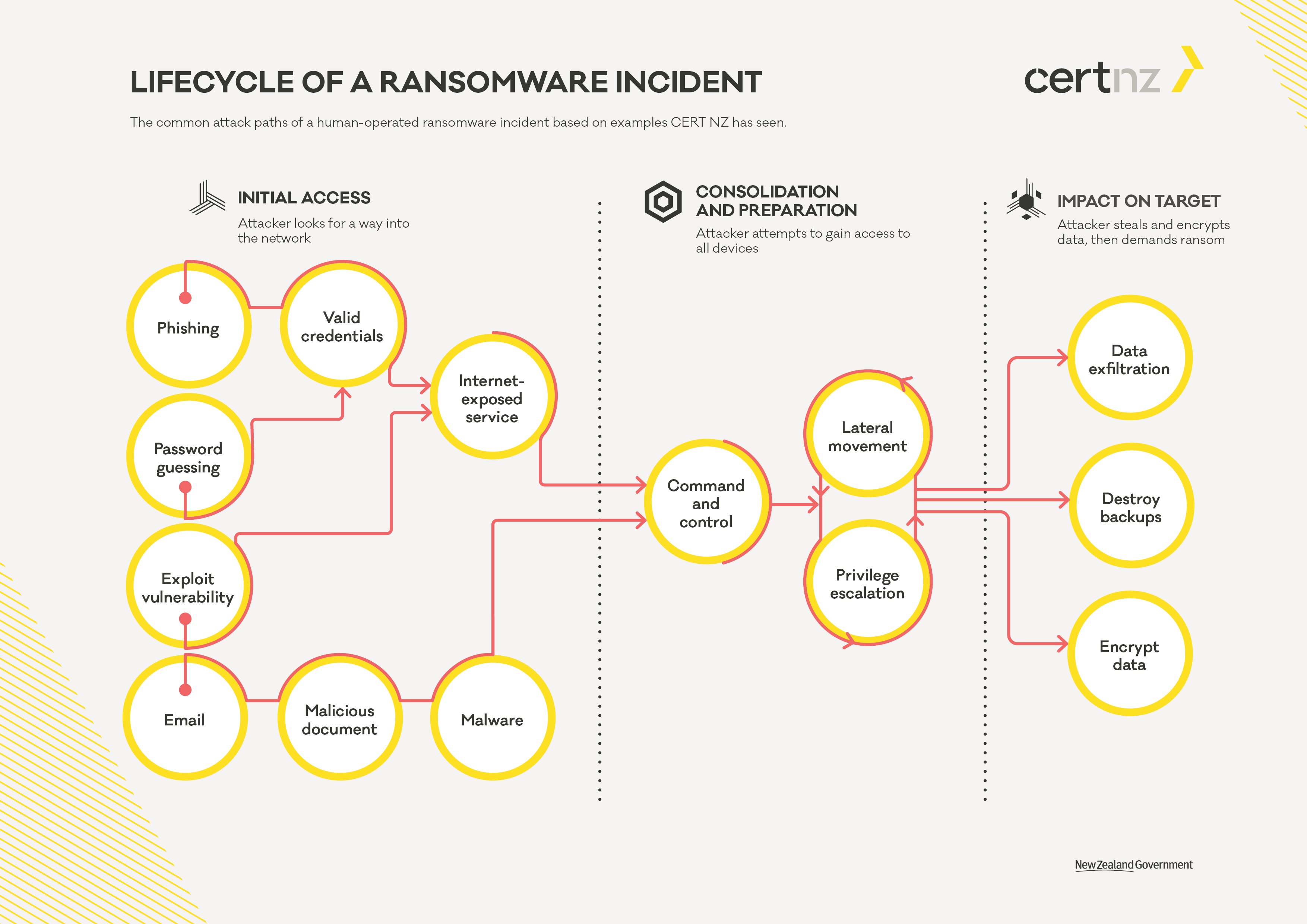
This diagram explains the common stages of a ransomware incident carried out manually by threat actors. Let us go through each phase one by one in simpler language.
Phase 1: Initial Access
The attack usually begins by finding a way into the victim’s network. Some common methods used by attackers include:
- Phishing: Deceptive emails containing links that trick users into entering sensitive information such as usernames and passwords or installing malware.
- Password Guessing: Guessing passwords. As we know, users often dislike creating complex passwords and tend to use easily guessed ones based on personal or company information.
- Vulnerability Exploitation: Gaining access through security gaps in applications or systems that are not properly secured or monitored.
- Malicious Email Attachments: Emails containing documents that appear important but actually contain malware that infects the system when opened.
In this phase, attackers typically look for valid credentials or exploit internet-exposed services to gain initial access to the system.
After successfully gaining entry, threat actors proceed with what is known as “lateral movement” to expand their control within the compromised network.
Phase 2: Consolidation and Preparation
After gaining access, attackers do not immediately launch the ransomware. They first establish stronger control to ensure the attack will be more effective. Activities in this phase include:
- Command and Control (C2): A program deployed on the victim’s system to receive commands from the attacker, enabling remote control.
- Lateral Movement: Moving to other systems within the network to expand control, either by exploiting vulnerabilities or using stolen credentials.
- Privilege Escalation: Increasing access rights to gain broader control, for example from a standard user to an administrator or obtaining higher roles within Active Directory.
During this phase, attackers aim to control as many endpoints as possible, including servers, workstations, user credentials, service accounts, and ideally the domain controller. This enables them to conduct a broader and more effective attack.
Phase 3: Impact on Target
After gaining full control, attackers execute their primary objectives:
- Data Exfiltration: Stealing data before encryption. This is typically used as leverage to threaten victims with public disclosure if ransom is not paid.
- Destroy Backups: Identifying and destroying backup systems so victims cannot restore data without paying the ransom.
- Encrypt Data: Encrypting critical systems and data, then leaving a ransom note.
At this stage, the ransomware attack is nearly complete. Victims usually receive a ransom demand requesting payment in cryptocurrency in exchange for a decryption key. If the victim refuses to pay, the data may be permanently lost and/or published on the dark web.
How Security Solutions Can Break This Lifecycle
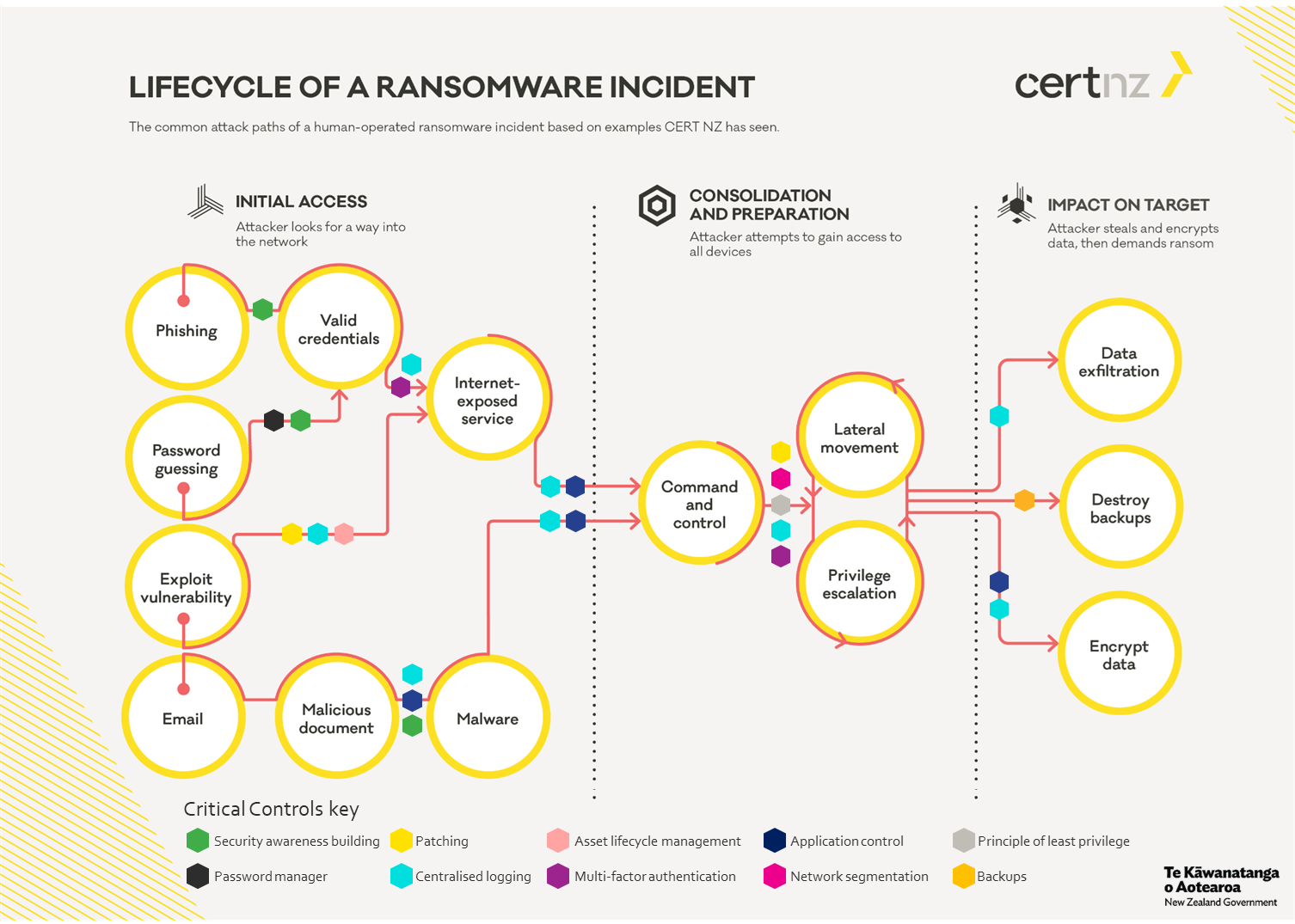
Fortunately, many security solutions can help disrupt the ransomware lifecycle at different stages. Below are examples of how various types of solutions can prevent or intervene during ransomware attacks:
Endpoint Protection and EDR
- Detect malware at an early stage through signature-based or behavioral analysis.
- Prevent payload execution from malicious documents or exploitation tools.
- Stop lateral movement by monitoring suspicious inter-host activity.
Solutions such as CrowdStrike, SentinelOne, or Microsoft Defender for Endpoint are highly effective, though they may require significant budget and skilled IT personnel to manage properly.
Human expertise remains critical, as even the best tools will not function optimally without capable operators.
Firewall and IDS/IPS
- Block access to command and control servers.
- Identify suspicious inbound and outbound network communication.
- Filter access to unnecessary internet-exposed services.
Firewalls such as pfSense or FortiGate can be used for this purpose. For more advanced detection, UTM or IDS/IPS solutions are recommended, typically combined with centralized logging and monitoring systems such as SIEM.
Proper configuration, strict access control, network segmentation, and well-tuned IDS/IPS profiles are essential for optimal effectiveness.
Email Security Gateway
- Block phishing emails and malicious attachments before they reach users’ inboxes.
- Analyze URLs and files embedded within emails.
Solutions such as Proofpoint, Mimecast, FortiMail, or Barracuda Email Security can help prevent initial access, which often begins with phishing emails or malicious attachments.
User awareness remains a critical defense layer.
Backup and Recovery
- Provide secure and offline backups, ensuring recovery is possible without paying ransom.
- Protect backup integrity from deletion or encryption attacks.
Backup solutions such as Veeam, Acronis, or cloud services like AWS Backup can help ensure data safety. Backups should be performed regularly and stored separately from the main network to avoid encryption by ransomware.
Identity and Access Management
- Reduce privilege escalation risk by applying the principle of least privilege.
- Implement Multi-Factor Authentication (MFA) to prevent misuse of stolen credentials.
In a zero trust architecture, user and device identity is critical. Solutions such as Okta, Entra ID, or Google Workspace can help manage access securely and efficiently.
Applying least privilege, Identity Protection, Privileged Access Management (PAM), and Zero Trust Architecture (ZTA) further reduces the risk of unauthorized access.
Patching and Vulnerability Management
- Ensure systems are consistently updated to reduce exploitation risks.
- Identify and remediate security gaps that attackers could exploit.
Solutions such as Qualys, Tenable, or Microsoft Defender for Endpoint can assist with automated patching and vulnerability management, though skilled IT oversight is still required.
There is no single solution that guarantees complete protection. A layered defense approach combining multiple technologies and strong security policies is the key to protecting organizations from ransomware threats.
If the Budget Is Limited, What Can Be Done?

Cybersecurity does not have to be expensive from the start. If you are a small or medium business owner or just building an IT team, here are priorities that can be implemented with minimal cost:
1. User Education (Security Awareness)
Phishing remains a primary entry point. Train employees to:
- Avoid clicking suspicious links or emails.
- Avoid downloading attachments from unknown senders.
Free tools such as GoPhish can be used for phishing simulations, or simple monthly awareness sessions can be conducted.
2. Use a Password Manager and MFA
Avoid password reuse. Use a password manager such as Bitwarden and enable MFA on all services whenever possible.
3. Offline Backup
Back up data regularly to an external hard drive and disconnect it after completion. This simple step is highly effective against ransomware encryption.
4. Regular Updates and Patching
Do not delay operating system, application, or plugin updates. Many ransomware attacks exploit unpatched systems.
Enable auto-update whenever possible.
5. Use Free Antivirus or EDR
If enterprise-grade EDR solutions are not yet feasible, use:
- Microsoft Defender (sufficient for Windows 10/11)
- Other reputable free endpoint protection solutions
Closing
Understanding this lifecycle helps us remain vigilant at every stage. However, understanding alone is not enough. Implementing the right solutions at each stage determines whether an attack fails or succeeds. The best prevention combines technology, user awareness, and solid security policies.
Cybersecurity is like insurance. We never know when it will be needed, but when an incident occurs, we are grateful to have prepared in advance.
Although security implementation does not guarantee 100 percent protection from ransomware, it significantly reduces risk and impact while enabling earlier detection before incidents escalate into major problems.
Do not wait until ransomware strikes before taking action. Even with secure backups, recovery can take significant time, disrupt operations, and incur substantial costs. Prevention is always better than paying a ransom that may not guarantee full data restoration.
By understanding the ransomware attack lifecycle, we can be better prepared and more responsive to evolving threats.
Stay safe and protect your systems and environments properly.
