Execution After Redirect with Burp Suite
Execution After Redirect or EAR is a technique used to execute code after the redirect process. This technique is usually used to bypass several security features that exist in web applications. In this article, we will discuss how to exploit EAR using Burp Suite.
What is Execution After Redirect (EAR)?
Execution After Redirect is usually found in web applications with native style code that use a redirect mechanism to direct users to another page after performing a certain process, such as after login or registration. In some cases, the web application does not call the exit() or die() function after performing the redirect process, so the code after the redirect process continues to be executed.
EAR most commonly occurs on dashboard access that has session validation. If the session is not valid, the web application will redirect to the login page. However, if the web application does not call the exit() or die() function after performing the redirect process, then the code after the redirect process will still be executed. This can be exploited by attackers to perform EAR exploitation.
For more detailed reading about EAR, you can refer to OWASP.
Example Case of Execution After Redirect
The following is a simple example of EAR:
<?php
session_start();
if (!isset($_SESSION['user'])) {
    header('Location: index.php');
    // exit(); // If the exit function is not called, then the code below will still be executed
}
echo "Welcome to the dashboard!";
?>
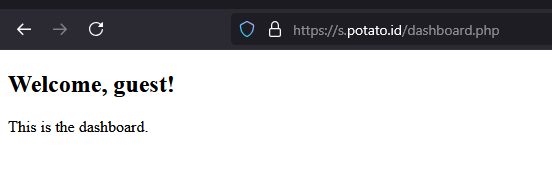
In the code above, if the user does not have a valid session, the web application will redirect to the login page. However, because the exit() function is not called after the redirect process, the code echo "Welcome to the dashboard!"; is still executed. This can be exploited by attackers to exploit this vulnerability.
Generally in real world applications, the data displayed is not only welcome to the dashboard but sometimes contains the CMS dashboard itself without having to perform authentication first. This can be used by attackers to perform further attacks such as searching for file upload features, accessing sensitive data, or performing other actions to gain deeper access to the web application or the server running the application.
Exploiting EAR with Burp Suite
As we know, Burp Suite is a tool that is often used by pentesters to perform penetration testing on web applications. One of the features owned by Burp Suite and favored by pentesters is the Proxy feature. This feature allows us to intercept requests and responses sent by web applications.
To exploit EAR using Burp Suite, we need to perform the following steps:
- Open Burp Suite and enable the Proxy feature.
- Open the browser and set the proxy to localhost with the port used by Burp Suite.
- Send a request to the web application to be tested, then access a page that has EAR potential, such as a dashboard page that requires authentication.
- In Burp Suite, look for responses that contain parameters that can be manipulated to perform EAR, such as redirect parameters in the HTTP response header, javascript redirect, or HTTP 302 response code.
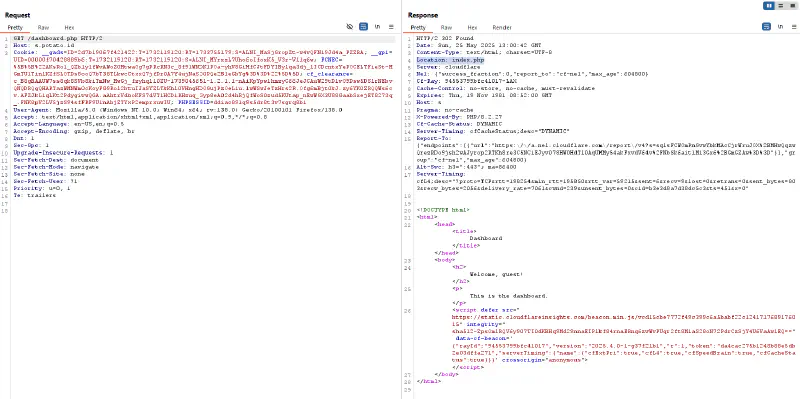
- Modify the request by removing the redirect parameter or changing its value to avoid the redirection process.
- Send the request and we will see that the code after the redirect process will be executed because the redirect parameter has been removed.
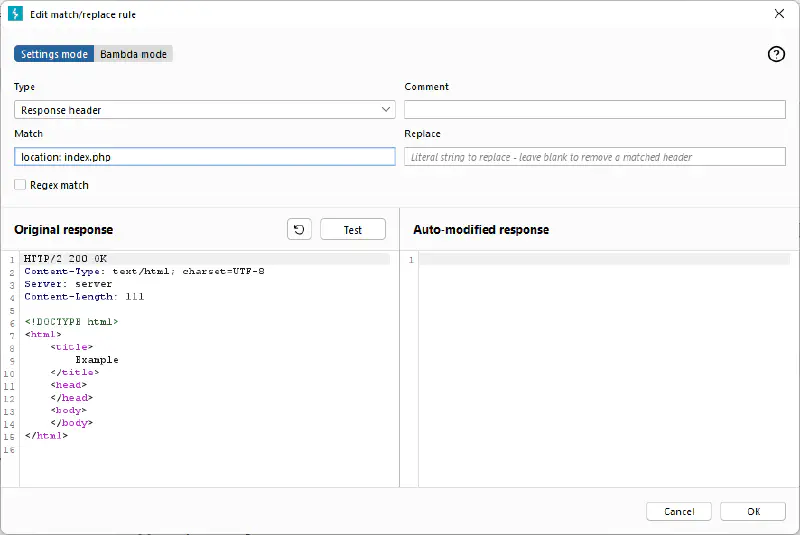
- To make EAR exploitation easier, we can use match and replace in the Proxy feature in Burp Suite to automatically remove redirect parameters in every request sent, so we do not need to manually modify it every time we send a request.
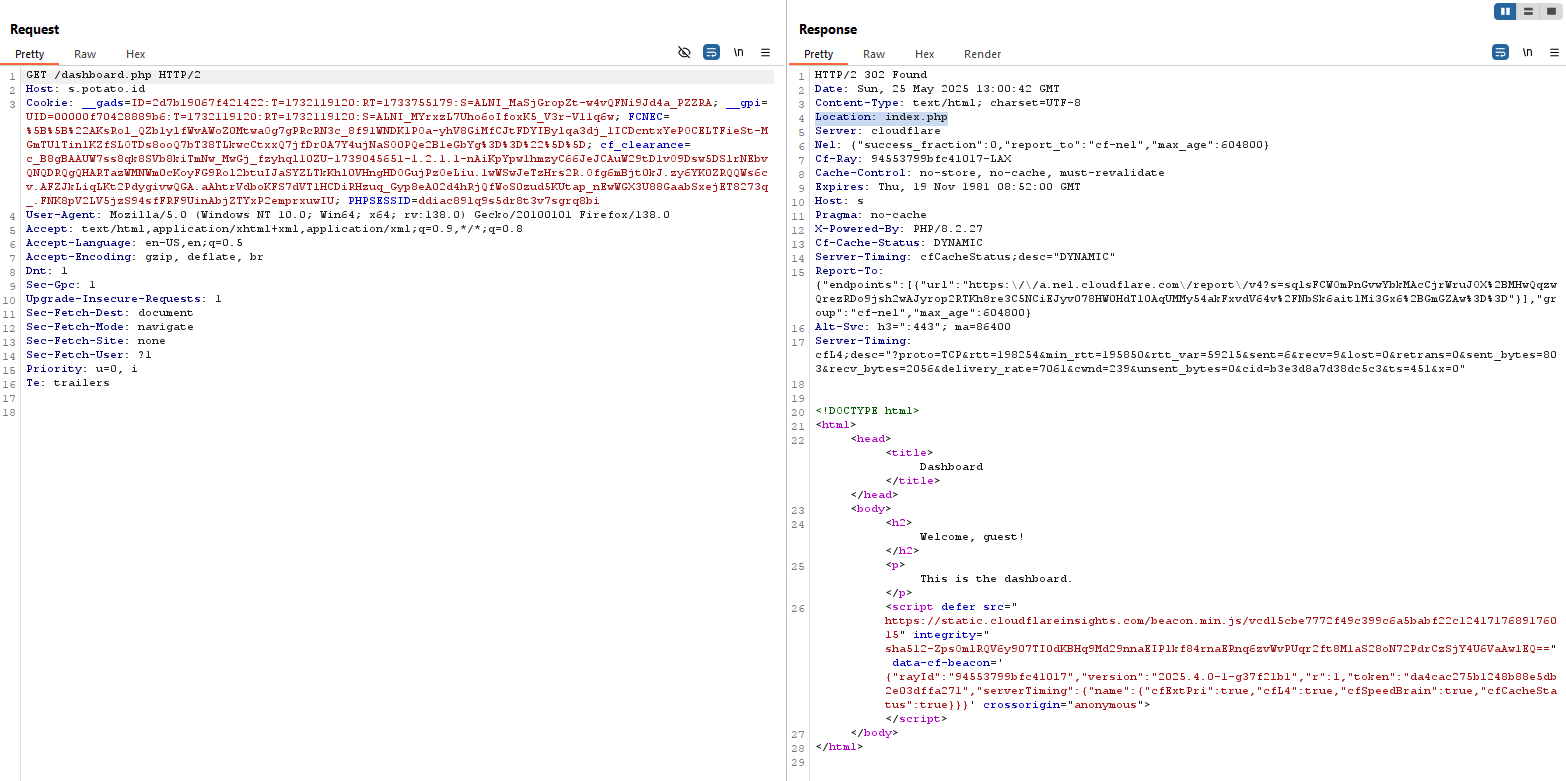
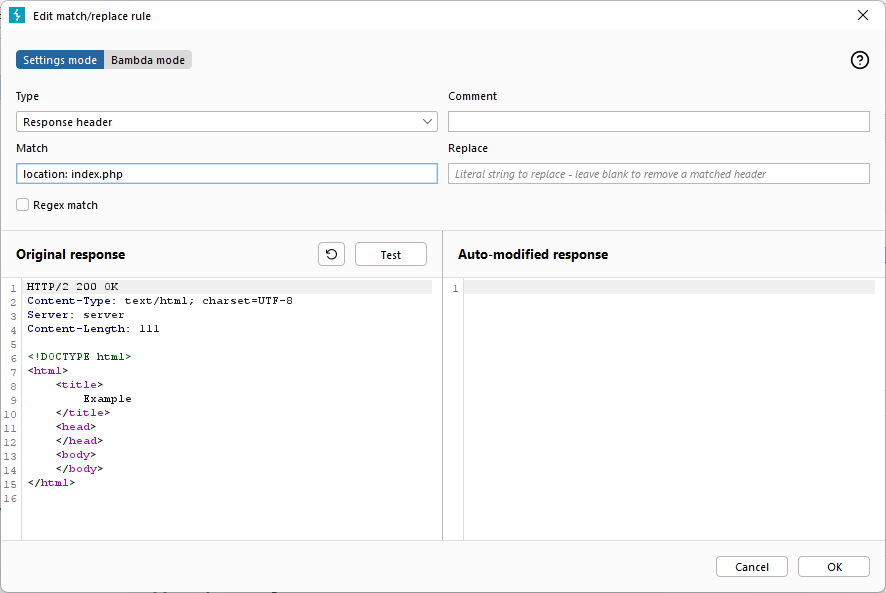
By exploiting EAR, we can bypass several security features that exist in web applications. Therefore, it is very important for web application developers to pay attention to the security of their applications and prevent EAR exploitation.
How to Prevent Execution After Redirect
To avoid EAR attacks, web application developers can take the following steps:
- Call the exit() or die() function after performing the redirect process to ensure that no code is executed after the redirect process.
- Use a secure redirect mechanism, such as using the HTTP response header to perform the redirect.
- Validate input received from users.
- Monitor the web application periodically to detect EAR attacks or other attacks.
The following is the response after adding the exit() function to the example code above earlier, try to compare it with the previous response that did not call the exit() function.
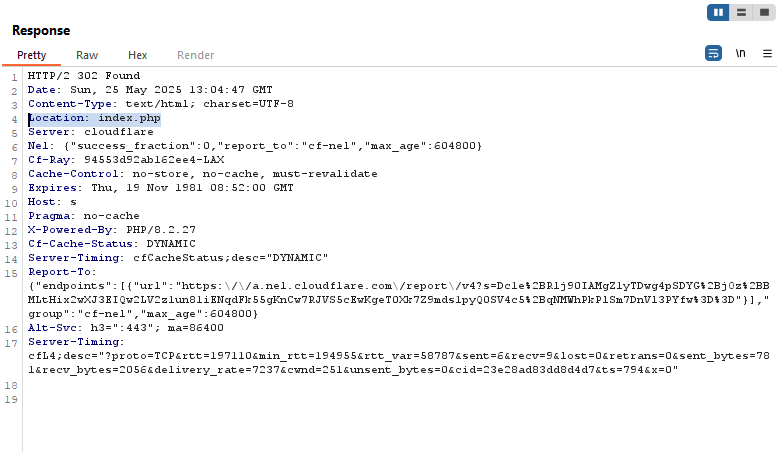
The server response will automatically not display the message “Welcome to the dashboard!” because the exit() function has been called after the redirect process. Thus, the code after the redirect process will not be executed.
By performing the steps above, web application developers can prevent EAR attacks and maintain application security.
That is all and hopefully this writing is useful and can increase our knowledge together. Thank you.
