Dynamic IP Denylisting with NGINX Plus and fail2ban

This article is based on the original NGINX blog post by Liam Crilly of F5, published September 19, 2017.
You may not realize it, but your website is under constant threat. If it’s running WordPress, bots are trying to spam you. If it has a login page, there are brute-force password attacks. You may also consider search engine spiders as unwanted visitors.
Defending your site from unwanted, suspicious, and malicious activity is no easy task. Web application firewalls are effective tools and must be considered as part of your security stack. For most environments, there’s no such thing as too much security, and a multi-layered approach is invariably the most effective.
In this post, we’ll discuss the use of fail2ban as another layer of the web security stack. Fail2ban is an intrusion detection system (IDS) which continually monitors log files for suspicious activity, and then takes one or more preconfigured actions. Typically fail2ban monitors for failed login attempts and then blocks (bans) the offending IP address for a period of time. This is a simple yet effective defense against brute-force password attacks.
In NGINX Plus R13, a native key-value store and a new NGINX Plus API were introduced. This allows for dynamic configuration solutions in which NGINX Plus behavior can be driven by an external system. We’ll show how fail2ban can be used to automatically reconfigure NGINX Plus to ignore requests from IP addresses that have caused multiple failed authentication events.
Note: In NGINX Plus R16 and later, key-value stores can be synchronized across all NGINX Plus instances in a cluster.
Read Also: Harderning Server with Fail2ban and Reporting to Telegram

Using a Key-Value Store for IP Denylisting
The NGINX Plus key-value store is a native, in-memory store with three primary characteristics:
- Key-value pairs are represented as JSON objects
- Key-value pairs are managed entirely through an API
- The values are available to NGINX Plus as regular configuration variables
The key-value store is defined by creating a shared memory zone named by the keyval_zone directive. The keyval directive then defines which existing variable will be used as the lookup key ($remote_addr in the example), and the name of a new variable ($num_failures) that will be evaluated from that key’s corresponding value.
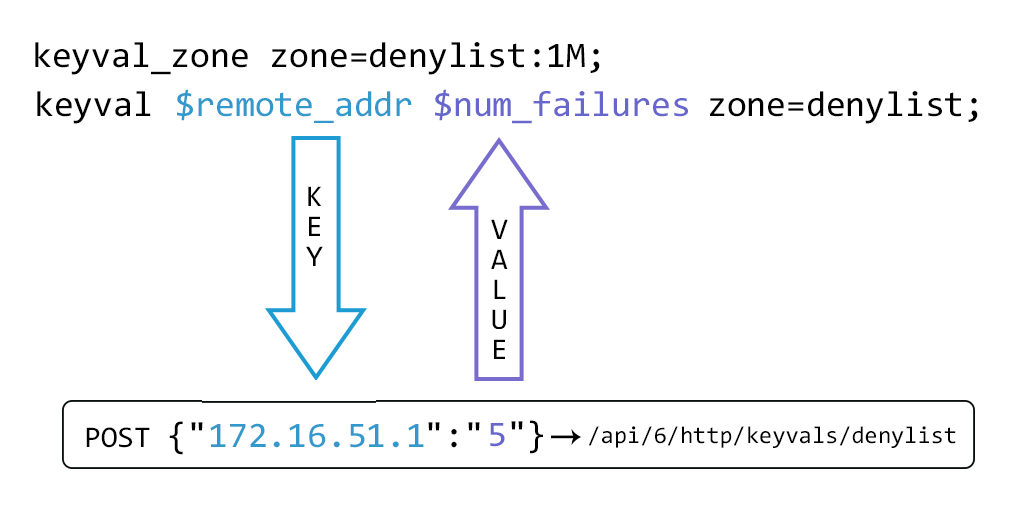
The API is enabled by designating a location block as the NGINX Plus API endpoint:
server {
    listen 1111;
    allow  127.0.0.1; # Only allow access from localhost,
    deny   all;       # and prevent remote access.

    location /api {
        api write=on; # The NGINX Plus API endpoint in read/write mode
    }
}
Before we add key-value pairs to it, a request for the contents of the denylist store returns an empty JSON object:
$ curl http://localhost:1111/api/6/http/keyvals/denylist
{}
The key-value store can now be populated with an initial key-value pair using HTTP POST:
$ curl -iX POST -d '{"10.0.0.1":"1"}' http://localhost:1111/api/6/http/keyvals/denylist
HTTP/1.1 201 Created
...
A key-value pair is removed by PATCH-ing the key with a value of null:
$ curl -iX PATCH -d '{"10.0.0.1":null}' http://localhost:1111/api/6/http/keyvals/denylist
HTTP/1.1 204 No Content
...
All key-value pairs can be removed from the store by sending the DELETE method:
$ curl -iX DELETE http://localhost:1111/api/6/http/keyvals/denylist
HTTP/1.1 204 No Content
...
A simple implementation of IP denylisting can now be configured:
keyval_zone zone=denylist:1M;
keyval $remote_addr $num_failures zone=denylist;

server {
    listen 80;

    location / {
        root /usr/share/nginx/html;
        if ($num_failures) {
            return 403;
        }
    }
}
This configuration evaluates $num_failures against the denylist key-value store using $remote_addr (client IP) as the key. If the client IP has been POSTed to the store, all requests return HTTP 403 Forbidden.
The advantage of this approach, compared to using a map block, is that the IP denylist can be controlled by an external system without requiring an NGINX reload.
Using fail2ban to Dynamically Manage the IP Denylist
Fail2ban is commonly used to detect malicious activity in log files and then take action. The default action configures iptables to drop all packets from the offending IP — effective, but provides a poor user experience for genuine users who simply forgot their password. To those users, the website appears completely unavailable.
The following fail2ban action instead submits the offending IP address to the NGINX Plus denylist key-value store. NGINX Plus then displays a helpful error page and applies a rate limit to that IP address, effectively neutralizing the attack.
fail2ban Action: nginx-plus-denylist.conf
Place this file in /etc/fail2ban/action.d/:
[Definition]
actionban   = curl -s -o /dev/null -d '{"<ip>":"<failures>"}' http://localhost:1111/api/6/http/keyvals/denylist
actionunban = curl -s -o /dev/null -X PATCH -d '{"<ip>":null}' http://localhost:1111/api/6/http/keyvals/denylist
fail2ban Jail: jail.local
Enable the built-in filter for NGINX HTTP Basic Auth failures:
[DEFAULT]
bantime   = 120
banaction = nginx-plus-denylist

[nginx-http-auth]
enabled = true
Full NGINX Plus Configuration: password_site.conf
Place this in /etc/nginx/conf.d/:
server {
    listen 1111;
    allow  127.0.0.1; # Only allow access from localhost,
    deny   all;       # and prevent remote access.

    location /api {
        api write=on; # The NGINX Plus API endpoint in read/write mode
    }
}

keyval_zone zone=denylist:1M state=denylist.json;
keyval $remote_addr $num_failures zone=denylist;

limit_req_zone $binary_remote_addr zone=20permin:10M rate=20r/m;

server {
    listen 80;
    root /usr/share/nginx/html;

    location / {
        auth_basic "closed site";
        auth_basic_user_file users.htpasswd;

        if ($num_failures) {
            rewrite ^.* /banned.html;
        }
    }

    location = /banned.html {
        limit_req zone=20permin burst=100;
    }
}
Key points in this configuration:
- The
state=denylist.jsonparameter persists the key-value store across NGINX Plus restarts limit_req_zonecreates a rate limit of 20 requests/minute per IP (20permin)- When an IP is denylisted, requests are rewritten to
/banned.htmlinstead of returning 403 - The
/banned.htmllocation applies the rate limit to prevent resource exhaustion from attack traffic
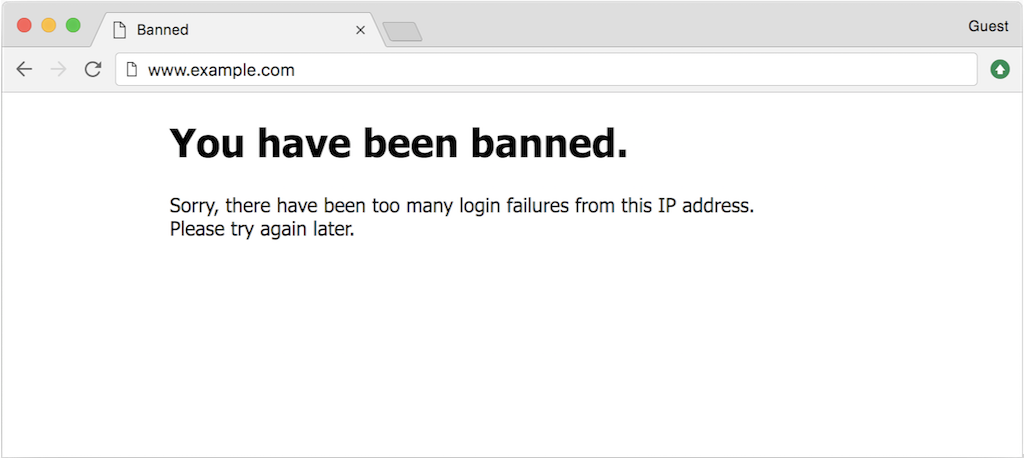
Testing the Setup
Simulate successive failed login attempts:
$ curl -i http://admin:[email protected]/
HTTP/1.1 401 Unauthorized
...
$ curl -i http://admin:[email protected]/
HTTP/1.1 401 Unauthorized
...
# (repeat 5 times)

$ curl http://admin:[email protected]/
<!DOCTYPE html>
<html>
<head>
<title>Banned</title>
...

$ tail -f /var/log/fail2ban.log
2017-09-15 13:55:18,903 fail2ban.filter   [28498]: INFO    [nginx-http-auth] Found 172.16.52.1
2017-09-15 13:55:28,836 fail2ban.filter   [28498]: INFO    [nginx-http-auth] Found 172.16.52.1
2017-09-15 13:57:49,228 fail2ban.filter   [28498]: INFO    [nginx-http-auth] Found 172.16.52.1
2017-09-15 13:57:50,286 fail2ban.filter   [28498]: INFO    [nginx-http-auth] Found 172.16.52.1
2017-09-15 13:57:52,015 fail2ban.filter   [28498]: INFO    [nginx-http-auth] Found 172.16.52.1
2017-09-15 13:57:52,088 fail2ban.actions  [28498]: NOTICE  [nginx-http-auth] Ban 172.16.52.1
2017-09-15 13:59:52,379 fail2ban.actions  [28498]: NOTICE  [nginx-http-auth] Unban 172.16.52.1
After 120 seconds (bantime in jail.local), fail2ban automatically removes the IP from the denylist using the NGINX Plus API, and login attempts are accepted again from that address.
How It All Works Together
This dynamic IP denylisting solution runs without any further configuration changes once set up:
- fail2ban watches NGINX access/error logs for failed authentication events
- On threshold breach, fail2ban calls the NGINX Plus API to add the IP to the key-value store
- NGINX Plus immediately starts serving the
/banned.htmlpage to that IP with rate limiting applied - After
bantimeexpires, fail2ban calls the API again to remove the IP from the denylist
No NGINX configuration file editing. No nginx -s reload. Just a live, dynamic denylist controlled entirely through the API.
Summary
| Component | Role |
|---|---|
| fail2ban | Detects brute-force attempts in log files |
| NGINX Plus API | Receives ban/unban commands from fail2ban |
| Key-value store | Holds the live denylist in memory |
keyval directive |
Maps client IP to denylist status |
limit_req_zone |
Rate-limits banned IPs to protect resources |
The NGINX Plus API and key-value store make this type of integration possible — dynamic configuration without reloads, driven entirely by external systems.
